You spend more time typing on your phone than almost anything else. It's your portal to the world, your connection to loved ones, and your tool for getting things done. So why settle for a keyboard that feels generic, cramped, or just plain wrong for you? If you're a Samsung Galaxy owner, the answer is simple: you don't have to. You can now customize the keyboard on your Samsung Galaxy to perfectly match your aesthetic and your typing habits, transforming a mundane input method into a personalized extension of your digital life.
Unlock Your Keyboard's Potential with Keys Cafe
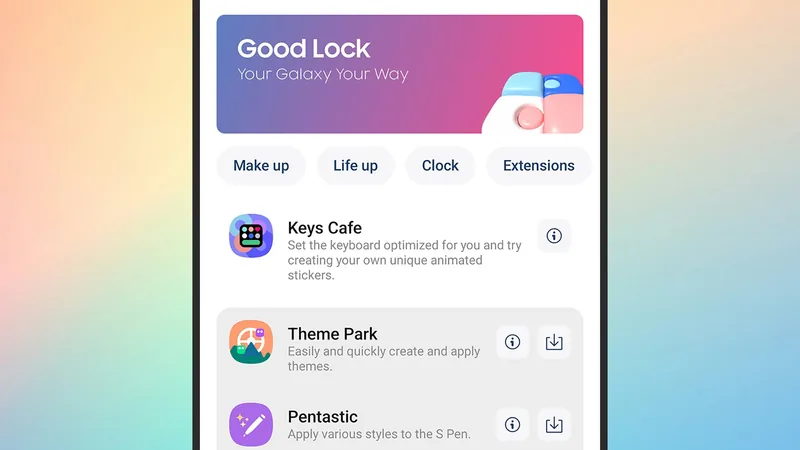
While there are many third-party keyboards available, Samsung offers a powerful, built-in solution through its Good Lock suite. This official add-on, called Keys Cafe, lets you dive deep into the nitty-gritty of your keyboard's design and functionality. It's not just about changing colors; it's about fundamentally reshaping how you interact with your device.
To get started, you'll need to download the Good Lock app from the Google Play Store or the Samsung Galaxy Store. Good Lock itself is a treasure trove of One UI customization tools, from enhancing camera features to creating dynamic wallpapers. Within Good Lock, navigate to the 'Plugins' section and find Keys Cafe. Tap the download icon, and once installed, launch it. You'll find it also appears as a standalone app on your home screen.
Keys Cafe isn't solely focused on creation. It offers insights into your typing habits, including speed statistics, and even includes games designed to boost your typing prowess. For those who prefer a quicker update, a variety of pre-made themes are also available to apply instantly.
Ready to get creative? Head over to the 'Keyboard' tab and select 'Make.' You'll see basic templates based on your current keyboard. Choose one as a starting point, then tap 'Edit' to enter the main creation screen. This is where the magic happens, and you can truly you can now customize your typing experience.
Designing Your Dream Keyboard
The editing screen presents a grid of all available characters. Drag and drop these onto your keyboard design below. Imagine adding dedicated keys for your most-used emojis, specific web addresses, or even custom text snippets for work. This level of personalization is key to boosting efficiency.
Tapping on individual keys allows for granular adjustments. You can change the height and width of each key, perfect for creating a more spacious backspace or a larger spacebar if those are your pain points. Holding down keys lets you select multiple at once for simultaneous adjustments, streamlining the process.
Need more or fewer rows? An icon above the keyboard grid allows you to add or remove rows easily. If you get lost in the customization, a reset button is conveniently located in the top right corner, alongside an undo function for quick corrections. Once satisfied with the layout, tap the checkmark to save your new keyboard structure.
Beyond layout, Keys Cafe lets you overhaul the visual appeal. Navigate to the 'Design' section within the 'Keyboard' tab and tap the plus icon. Here, you can create distinct visual themes that can be paired with any of your custom layouts. You can customize the main keyboard background, individual key colors, character colors, and borders.
But it doesn't stop at static design. Keys Cafe also allows you to add animated effects. Choose from various animations that can be applied when keys are pressed or during swipe typing, adding a dynamic flair to your interaction. You can even tweak the sound effects associated with each keystroke, further personalizing the tactile feedback. Once you've finalized both the layout and the design, save your theme. Your newly customized keyboard is now ready to use, making your daily typing tasks more enjoyable and efficient. It's a powerful reminder that you can now customize nearly every aspect of your phone's interaction.
For instance, imagine creating a work-focused layout with quick-access keys for common code snippets or client names, paired with a minimalist, dark theme for late-night coding sessions. Or perhaps a gaming layout with larger, more responsive directional keys and vibrant, energetic animations. The possibilities are extensive, allowing you to truly make your Samsung keyboard unique. This level of control means you can now customize your device to suit any task or mood.
Samsung's Keys Cafe empowers you to move beyond a one-size-fits-all approach. By investing a little time in customization, you gain a more comfortable, efficient, and visually pleasing typing experience. It's a testament to how small, personalized touches can significantly enhance your daily digital interactions, proving that you can now customize your phone's most fundamental tool.