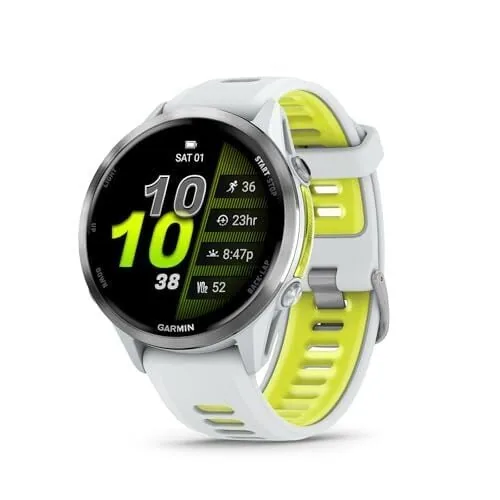
If you've been training for a race, you know the feeling: the mix of excitement and nerves as race day approaches. You've put in the miles, dialed in your nutrition, and now it's time to rely on your trusty Garmin watch. But here's the truth - even the most advanced watch is only as good as its setup. I learned this firsthand, strapping two Garmins to my wrists for a recent 10K. Whether you're aiming for a 5K PR or tackling a marathon, having here's my ultimate checklist before race day can make all the difference.
Prepare Your Garmin Watch During Training
Once you've signed up for your race, the real work begins. The first step in leveraging your Garmin is setting up a training plan within the Garmin Connect app. Navigate to Training & Planning > Training Plans to discover a wealth of free plans, from 5Ks to full marathons. Syncing a plan to your watch means daily workouts are delivered right to your wrist, keeping you on track.
Garmin's popular Coach plans offer adaptive training, with daily suggested workouts. These are available on many models, including the Forerunner 55 and Venu 3. As you move up to more advanced watches like the Forerunner 265, you get more sophisticated features, including projected race times and pace guidance. Top-tier models, such as the Forerunner 965, even offer real-time stamina scores, giving you an edge in understanding your current effort level (Garmin, 2024).
Before race week truly kicks off, it's wise to check your HRV Status and Training Readiness score. These metrics offer insights into how well your body has recovered and adapted to your training load. HRV Status is generally available on watches like the Forerunner 255 and higher, while Training Readiness is found on the Forerunner 265 and above. Simpler watches, like the Forerunner 165, provide a 'Body Battery' reading, which is still a valuable, albeit less detailed, indicator of your energy reserves.
Don't forget to manually add your race as an event in Garmin Connect. Go to Training & Planning > Courses or find the 'Events' section. Inputting the distance, date, and location not only serves as a calendar reminder but also activates race-day countdowns and widgets on compatible devices. If your specific race isn't listed, but a GPX course file is available, you can download and load it onto your watch. This enables turn-by-turn navigation and elevation previews on race day, ensuring you know exactly where you are on the course.
The Night Before Race Day Checklist
After several races and countless watch configurations, here's my ultimate checklist for race day prep. It's the detailed guide I wish I'd had from the start.
- Charge your watch fully. This sounds obvious, but in the flurry of pre-race excitement and tapering, it's easy to overlook. Plug it in the night before so you begin race morning at 100%.
- Confirm your data screens. Before the gun goes off, set up your activity profile. Ensure the data fields you want most--pace, heart rate, lap pace, distance--are easily visible. Go to Settings > Activities & Apps > Running > Data Screens. For racing, remember that less is often more. A screen cluttered with eight data fields is harder to read at speed than two or three large, clear numbers.
- Set up alerts. Pace, heart rate, or time alerts can be invaluable for discipline, especially in the early miles. If you tend to start too fast, set a minimum and maximum pace range. Racing by effort? A heart rate ceiling alert can keep you in check. Most Forerunner models allow custom alerts, but setting complex multi-condition alerts is more robust on models like the Forerunner 265 and higher.
- Configure auto lap. By default, Garmins often auto-lap every mile or kilometer. For a race, decide if you prefer laps by distance, by the official race markers, or manual laps. If you want manual control, especially for shorter races like a 5K, disable Auto Lap and use the lap button yourself. Some advanced watches offer a 'Timing Gate' option, which automatically triggers laps as you pass official course markers, providing a more accurate race distance recorded (Garmin, 2024).
- Check satellite signal. Open your running activity on your watch the night before and let it acquire a GPS signal. This helps pre-load satellite data, ensuring a quicker lock on race morning and more accurate pace data from the start.
- Set up Garmin's race day features. On higher-end models, activate race-specific tools. PacePro, for instance, offers a customized pacing strategy based on your goal time and course elevation. It suggests smart pacing mile by mile, adapting to hills and descents. Another fantastic feature for longer races is real-time stamina, available on models like the Forerunner 965. This metric estimates your remaining energy reserves and projects whether your current pace is sustainable, offering a crucial reality check mid-race (Runner's World, 2023).
Race Morning and During the Race
Race morning requires a few final checks to ensure your Garmin performs flawlessly. As you get ready, get a GPS lock early. Open your activity profile before heading to the start line and wait for the GPS indicator to turn solid. Don't start your watch until you have a clear signal; otherwise, your initial splits will be inaccurate.
If you use a chest strap heart rate monitor, like the HRM-Pro Plus, put it on and let it connect to your watch before the start. While wrist-based sensors are convenient, a chest strap generally provides more accurate heart rate data, especially during intense efforts when optical sensors can struggle (Mayo Clinic, 2023). If music powers your run, queue up your playlist beforehand. Many Garmin watches with 'Music' in their name allow you to store and play music directly from the watch, freeing you from carrying your phone.
During the race itself, use the lap button intentionally. If the official mile or kilometer markers don't align with your watch's auto-lap setting, press the lap button manually at these points. This ensures your splits accurately reflect the race course, rather than potentially drifting GPS distances. It's easy to become a 'data zombie' mid-race, constantly staring at your wrist. Train yourself to glance, don't stare. Check key metrics like current pace and heart rate for a second or two, then refocus on the road. Your watch is a tool, not a distraction.
Ultimately, trust your training. No watch can run the race for you. At some point, put the data in the background and run on feel. The best use of your race-day watch is to keep you honest in the first half, ensuring you have enough left for a strong finish. This detailed checklist is designed to help you achieve that.
Post-Race Review and Sync
As you cross the finish line, resist the urge to stop your watch immediately. Let it record for a few extra seconds to ensure all data is captured before stopping the activity. Then, sync your watch to Garmin Connect via Bluetooth while your phone is nearby. Your race data--splits, heart rate graph, elevation, and more--will be waiting for you in the app.
In Garmin Connect, dive into your race analysis. Review your pace curve, heart rate response, and cadence data. Identify where you might have faded or surged, and how your heart rate correlated with your perceived effort. This post-race review is invaluable for future training and race planning. It's part of here's my ultimate checklist for continuous improvement.
Whether you're sporting a basic Forerunner 55 or the top-tier Forerunner 970, working through this comprehensive checklist before race day will transform you into a smarter, more prepared racer. The advanced features are powerful, but only if you know how to utilize them effectively.