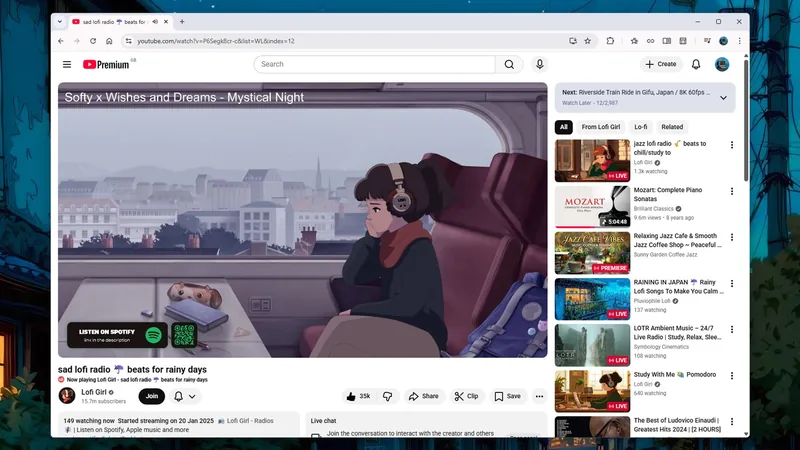
The gentle hum of lo-fi beats fills your workspace, a familiar soundtrack to focused work. You've spent hours immersed in these instrumental mixes, a vital tool for concentration. But the moment you switch gears, eager to catch up on your favorite vlogger or a documentary, your screen floods with… more lo-fi. The algorithm, once your helpful guide, has become a stubborn echo chamber, a problem many of us face. For me, this became my biggest frustration, until I discovered a simple, yet powerful, YouTube feature: 'channels' solved my biggest recommendation dilemma.
The Recommendation Trap
YouTube is an endless ocean of content. From DIY tutorials and breaking news to heartwarming pet videos and deep dives into historical events, there's always something new to discover. This vastness is its strength, but it's also where the trouble begins. We don't consume content in a single, monolithic way. One day you might be researching complex car repairs, the next you're unwinding with a nature documentary.
The issue arises when your viewing history, intended for one purpose, bleeds into recommendations for another. Imagine spending an entire weekend troubleshooting a tricky home repair, only to have your feed thereafter dominated by plumbing and electrical guides. It's a common frustration, and for me, it was the constant barrage of background music mixes. I'd put them on to work, but then struggled to find anything else when I wanted to actively watch other content. My feed became a one-track mind, stuck on chill-out vibes.
You might think of solutions like YouTube's incognito mode, but it's often limited to mobile and can disconnect you from your account. Or perhaps you've considered YouTube Music, but finding specific background tracks can feel like a chore. Even using a private browser window cuts you off from your subscriptions and reintroduces ads--a hassle, especially if you're a Premium subscriber.
Introducing YouTube Channels
This is where the magic of YouTube 'channels' solved my biggest problem. Think of them as distinct personas or profiles within your main account. You don't need a separate Google account; it's a seamless integration that keeps your digital lives neatly compartmentalized. You can easily switch between them right from the web interface, and remarkably, you won't even lose your place in a video when you do.
This feature is, frankly, one of YouTube's most underutilized gems. It siloes not just your watch history and recommendations, but also your comments, likes, uploads, and subscriptions. It's perfect for anyone who uses YouTube for multiple, distinct purposes. For instance:
- Creative Projects: Maintain a separate channel for your video editing projects, tutorials, or behind-the-scenes content, keeping it separate from your personal viewing.
- Learning & Development: Dedicate a channel to educational content, online courses, and skill-building videos, ensuring your learning journey doesn't skew your entertainment recommendations.
- Background Listening: Just like my experience, create a channel specifically for music mixes, podcasts, or ambient sounds you use while working or relaxing, preventing them from dominating your main feed.
Setting up a new channel is straightforward. Log in to YouTube on your desktop, click your profile avatar in the top right corner, and select 'Switch account' then 'View all channels'. From there, click 'Create a channel'. You'll be prompted to give your new channel a name, a handle, and a profile picture. For my background music needs, the specifics weren't crucial, but if you plan to make a channel public, you'll want to give its identity more thought.
Once created, you browse YouTube as usual, but now with a distinct identity. Your subscriptions, playlists, watch history, and recommendations are all unique to that channel. If you're a YouTube Premium subscriber, all those benefits seamlessly transfer over. This is precisely how 'channels' solved my biggest recommendation issue, allowing me to enjoy my focus music without sacrificing the diversity of my main feed.
Managing Your Channels
Switching between your channels on the web is as simple as clicking your profile picture in the top right and selecting 'Switch account'. On mobile, navigate to the 'You' tab, tap the cog icon, and then 'Switch or manage account'.
If you ever decide a channel no longer serves its purpose, removing it is also straightforward. Access your channel settings via your profile picture, 'View your channel', then 'Customize channel', followed by 'Settings', 'Channel', 'Advanced settings', and finally 'Remove YouTube content'. This process ensures that all associated data is cleanly deleted, keeping your YouTube experience streamlined.
By leveraging YouTube 'channels' solved my biggest problem of algorithmic clutter. It's a powerful, yet simple, tool that brings order to the chaos of online video consumption, ensuring you see what you want, when you want it. It's a testament to how a small feature can make a significant difference in your daily digital life (YouTube, 2024).