Google knows too much about you. We've all been there--searching something innocent, only to see related ads follow us for weeks. What if your search engine could protect your privacy while actually being more useful? That's where these hacks every DuckDuckGo user needs to know come in. DuckDuckGo isn't just a privacy-focused alternative--it's a powerhouse of features most users never discover.
Customizing Your DuckDuckGo Experience
DuckDuckGo's real power lies in how you can tailor it to your exact needs. While many users stick with the default settings, a few simple adjustments can transform how you interact with the search engine.
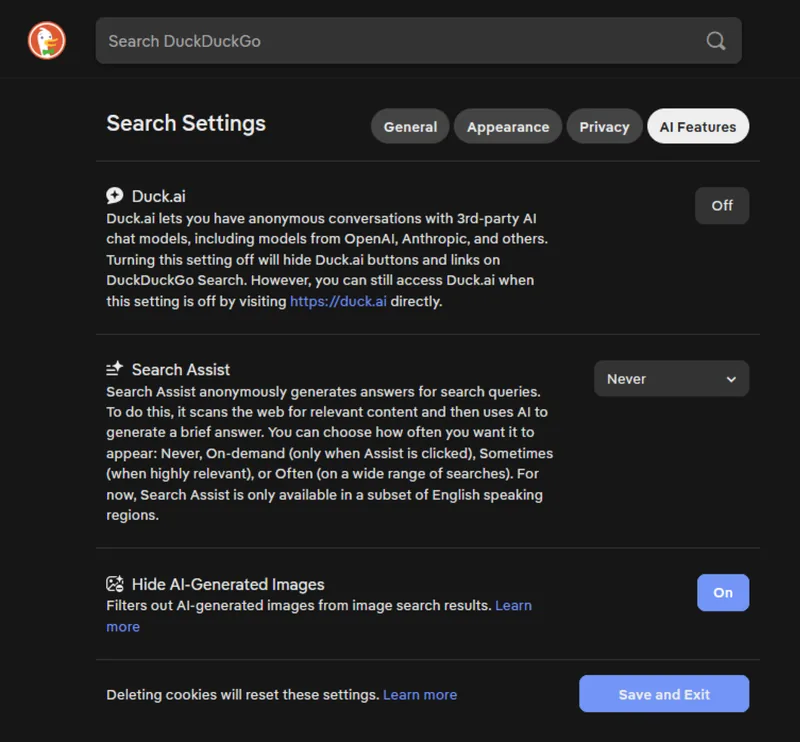
Recently, DuckDuckGo added AI features that might not appeal to everyone. If you prefer a cleaner, more traditional search experience, you can easily disable these extras. Head to the settings page, select AI Features, and turn off both Search Assist and Duck.ai. Suddenly, your homepage is free from AI prompts and results, giving you back that classic search feel.
But what about those AI-generated images cluttering your image searches? DuckDuckGo has a built-in filter to remove AI-generated content. Navigate to DuckDuckGo settings > AI Features > Hide AI-Generated Images. While not perfect (some AI images slip through), this feature significantly improves your search results by focusing on real photography.
Ever wish search result descriptions were longer? By default, DuckDuckGo shows just three lines of text for each result, but you can expand this to five lines for more context. In settings > Appearance > Max Snippet Length, change the dropdown to 5 lines. Now you can make better decisions about which links to click without having to open every tab.
And let's talk about those ads. While DuckDuckGo promises not to track you for advertising purposes, you can still disable search ads entirely. In settings > General, turn off Advertisements. While you're there, scroll down and disable prompts for other DuckDuckGo products like Install DuckDuckGo, Privacy Newsletters, Homepage Privacy Tips, and Help Improve DuckDuckGo. For a truly clean experience, also turn off the 'Protected' Reminder in the Appearance section.
Privacy & Security Enhancements
Privacy is DuckDuckGo's calling card, but most users don't realize just how deep these protection features go. Beyond not tracking your searches, DuckDuckGo offers several powerful tools to enhance your online security.
Want to use AI chatbots like ChatGPT or Claude without sacrificing your privacy? DuckDuckGo's Duck.ai service lets you access these tools anonymously. Simply visit Duck.ai, choose your preferred language model from the dropdown, and start chatting without creating an account. The service is free with daily limits, and it even lets you generate images and perform basic photo edits--all without tracking your activity.
Here's something most people overlook: your email address is a potential attack vector. If you use the same email for every service, a breach in one could expose you everywhere. DuckDuckGo's Email Protection creates unique email aliases for each sign-up. If a site gets compromised or sells your data, they only get the alias--not your real email. Plus, you can instantly identify which service leaked your data by checking which alias received spam.
Ever stumbled upon low-quality content in your search results? With DuckDuckGo, you can block entire domains from appearing in future searches. When you encounter a site you want to avoid, click the three dots next to any result from that domain and select "Block this site from all results." To manage your blocked sites, visit settings > General. This is especially useful for removing clickbait sites, misinformation sources, or pages with excessive ads.
Power Search Techniques
While DuckDuckGo excels at privacy, its search capabilities often surprise new users. These advanced techniques can transform how you find information online.
Ever wished you could use Google's index through DuckDuckGo? With "bangs," you can. Simply add !g to your search query, and DuckDuckGo will show Google results instead. This is just the beginning--!gi searches Google Images, !w looks up Wikipedia, !r searches Reddit, and !yt finds YouTube videos. The full list of available bangs is available on DuckDuckGo's documentation page. For example, searching "!g best restaurants near me" will show you Google's local business results while maintaining DuckDuckGo's privacy protections.
URL management becomes effortless with DuckDuckGo's built-in tools. Need to share a link but it's too long? Copy the URL and type "shorten" followed by the link in DuckDuckGo. The first result will be a shortened version using the is.gd service. Conversely, if you receive a shortened link and want to see where it leads, type "expand" followed by the shortened URL. DuckDuckGo will reveal the full destination without you having to click through.
Keyboard shortcuts can dramatically boost your productivity, but who has time to memorize them all? DuckDuckGo's "cheatsheets" provide instant access to shortcuts for popular apps. Try searching "cheatsheet Photoshop" or "cheatsheet Excel" to see a list of common keyboard shortcuts at the top of your results. While the initial display shows just a few shortcuts, you can click "Show More" to reveal hundreds more. This feature works for many popular applications, including Chrome, Lightroom, and Microsoft Office.
Here's a pro tip most DuckDuckGo users miss: you can use the search engine as a calculator, unit converter, and currency converter all at once. Try searching "15% of 200" or "convert 50 USD to EUR" for instant answers. For scientific calculations, use expressions like "sqrt(64)" or "sin(30 degrees)". These features make DuckDuckGo not just a search engine, but a productivity tool in its own right.
Another hidden gem is DuckDuckGo's weather capabilities. Beyond simple forecasts, you can ask for detailed conditions, hourly forecasts, and even weather comparisons between cities. Try searching "weather in Paris vs London" or "weather forecast for next week in Tokyo" for comprehensive weather information without leaving your search results.