Ever feel like your social media feed is a black hole of endless scrolling, sucking away precious time without much reward? You're not alone. Threads, while a powerful platform for connection, can quickly become overwhelming if you don't know how to tame it. What if you could reclaim that time, cut through the noise, and actually enjoy your experience? We've uncovered some smart strategies--essential hacks every Threads user should know--to transform your feed from chaotic to curated.
Master Your Threads Feed
Threads doesn't always serve up what you want, when you want it. But with a few tweaks, you can gain significant control. Think of it as upgrading from a crowded public bus to your own private car service.
One common frustration is the endless stream of content that isn't relevant. You might be looking for updates from friends or specific interests, but instead, you're bombarded with algorithmically suggested posts. Luckily, you can easily switch your default feed to show only posts from accounts you actually follow. Simply tap the two-lines icon in the top-left corner of the app, select the pencil icon, and drag 'Following' to the top. Now, every time you open Threads, you'll see the content you care about most, right away.
Beyond just following accounts, what if you want to hyper-focus on particular topics or even specific people without necessarily following them? Threads allows you to create custom feeds. Imagine setting up a feed just for marathon training updates or another dedicated solely to your favorite artists. To do this, swipe right to the Feeds page, tap the '+' button, give your feed a name, and then add keywords, profiles, or topics. This is a powerful way to curate information streams, making it one of the most useful hacks every Threads user can employ for deep dives into niche interests.
Let's talk about downloads. Sometimes you see a video you want to save - a hilarious pet clip or an insightful tutorial. Since Threads doesn't offer a native download feature, you'll need a third-party tool. For Android users, an app like 'Threads Downloader' works by pasting the post link. iPhone users might need a slightly more involved setup using shortcuts and apps like a-Shell mini and Scriptable, but once configured, you can initiate downloads directly from the share sheet. It's a clever workaround for saving content you love.
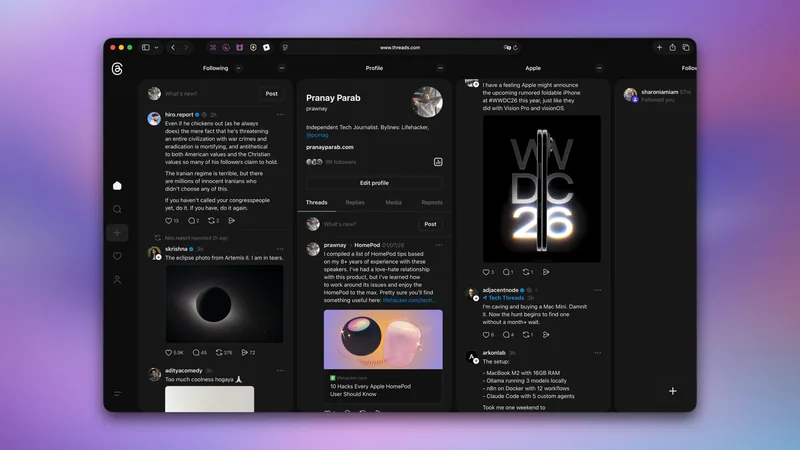
For those who appreciate a more organized, information-dense view, the desktop version of Threads offers a multi-column layout reminiscent of Tweetdeck. If you found that layout helpful for monitoring different streams simultaneously--your feed, mentions, notifications--you can replicate it here. Log in on your desktop, click the three-dots menu in the top-right, and select 'Add as column.' You can then add various views like 'Activity,' 'For You,' or 'Mentions.' Enabling 'Auto-update' ensures your columns refresh in real-time, keeping you instantly informed. This is a prime example of how hacks every Threads user can leverage the platform's less obvious features.
Control Your Privacy and Notifications
Meta platforms are notorious for their notification overload and cross-app sharing. Fortunately, Threads provides granular controls to manage your digital footprint and peace of mind.
Worried about your Threads posts spilling over onto Facebook or Instagram? If you have a public account, Threads might automatically suggest your posts on other Meta platforms. This can be great for creators but intrusive for many. To disable this, navigate to your profile, tap the two-line menu (top-right), go to Privacy > Suggesting posts on other apps, and turn off the toggles for both Instagram and Facebook. It's a crucial step for maintaining boundaries between your social networks.
Notifications can be a double-edged sword. While essential for direct messages, they can also be a constant barrage of suggested content and join notifications. You can significantly reduce the noise by customizing your notification settings. Go to your profile, hit the two-line menu, and select Notifications. Under 'From Threads,' disable suggested posts and join notifications. Further refine settings in 'Threads and replies' to turn off 'Insights,' 'Views,' and other non-essential alerts. This targeted approach ensures you don't miss important updates while silencing the digital chatter. Many users find this one of the most impactful hacks every Threads user can implement for daily calm.
Threads also offers integration with the Fediverse, allowing Mastodon users to see and interact with your posts. If you're active on both platforms or want to reach a broader decentralized audience, enabling this is simple. Go to Threads settings > Account > Fediverse sharing and follow the prompts. This opens up your content to a wider community beyond the immediate Threads ecosystem.
Another privacy setting to consider is 'Media reuse.' If your account is public, others can repost your photos and videos. To prevent this, go to Threads settings > Account > Media and disable 'Media reuse.' While it won't stop screenshots, it adds a layer of protection against casual reposting of your original content.
Searching on Threads can be sped up with a simple trick. Instead of tapping the search icon and then tapping the search bar again, try this: tap and hold the search icon. This action immediately opens the search page with the keyboard already active, saving you a crucial tap and getting you to your query faster. It's a small change that makes a difference in efficiency.
Finally, Threads shows your online status to followers. If you prefer to keep your activity private, you can hide this. Go to Threads settings > Privacy > Online status and select 'No one.' This simple setting helps maintain your privacy, ensuring your online presence is on your terms. These are just a few of the powerful hacks every Threads user can employ to create a more personalized, efficient, and private experience on the platform.