Everything you thought you knew about your car's navigation might be about to change. When Google announced Gemini's integration into Google Maps navigation, I was skeptical. Could this advanced AI truly enhance a road trip, or was it just another tech gimmick? So, I took Google Gemini on a road trip to find out.
Gemini: More Than Just A GPS
The latest update to Google Maps brings Gemini, Google's most capable AI, directly into your driving experience. For those using Android or iOS, saying 'Hey Google' now summons Gemini instead of the familiar Google Assistant. This isn't just a superficial change; it unlocks a significantly more conversational and advanced interaction, especially when you're on the move. I recently tested this integration extensively, using both the Android app and Android Auto, to see if Gemini could genuinely serve as a reliable travel companion.
From the moment I initiated my journey, Gemini proved its mettle in core navigation tasks. Every request I made, from finding specific destinations to plotting routes, was handled promptly and accurately. Adjusting my course or adding stops on the fly became remarkably simple using voice commands. Questions like 'What time will I arrive?', 'How's the traffic ahead?', or 'What's my next turn?' were answered without a hitch.
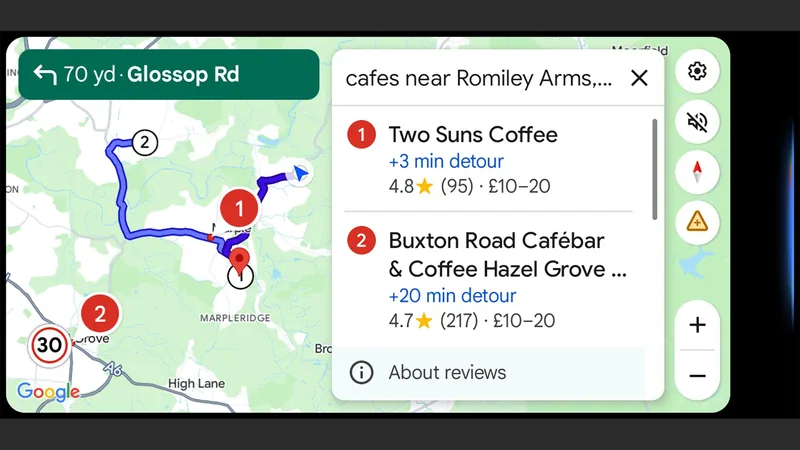
Beyond basic navigation, Gemini offered proactive assistance. I could inquire about the weather at my destination or get summaries of reviews for points of interest. When my plans shifted mid-trip, switching to a new destination was far more intuitive via voice than fumbling with a touchscreen on Android Auto. For instance, deciding to find a highly-rated coffee shop two exits ahead was a single spoken request, saving me from diverting my attention from the road.
There were minor hiccups, of course. Navigating back to the main turn-by-turn view after exploring alternative stops sometimes required specific phrasing. Initially, 'go back to navigation view' wasn't understood, but a command like 'clear search results' brought me back to the primary directions seamlessly. I also found that speaking clearly and a bit louder than usual helped Gemini interpret place names accurately, though it did occasionally mishear a location. Still, its contextual understanding was impressive; after the first mention of 'St. Mary's Church,' referring to it as 'the church' was perfectly understood.
Gemini's reliance on available data was evident when I asked for a more scenic route and was told it lacked sufficient information. However, it often compensated with helpfulness, frequently asking if there was anything else I needed or wishing me a safe drive, mirroring the proactive nature of the standalone Gemini app.
Gemini's Expanded Role on the Road
The true power of Gemini in Google Maps lies in its comprehensive AI capabilities. You're not just getting a smarter map; you're getting access to Gemini's broader knowledge base, all while keeping your hands on the wheel. I asked about recent news stories and received accurate summaries, and even queried the latest smartphone releases, though it did offer a slightly inaccurate detail about a hypothetical 'Galaxy S26' being a major leap from the S25, a minor hallucination typical of current AI.
Crucially, Gemini acted as a safety-conscious assistant. When I inquired about local driving regulations or the meaning of a specific road sign, it provided the information quickly while reminding me to focus on the road. This felt akin to having a knowledgeable passenger, as Google suggests, though the conversation sometimes felt a touch scripted.
Entertainment and communication were also integrated. Gemini could play music from services like YouTube Music, finding songs and artists on command. While it mostly worked, there was a moment I had to ask twice for music to stop, and switching to a different podcast app didn't fully execute the audio playback. However, the ability to access emails, calendar appointments, and respond to text messages without looking away from the road was a significant win. Getting directions to an upcoming meeting or letting someone know my estimated arrival time became effortless.
While I did encounter a few minor bugs and moments where the AI wasn't perfect, I was genuinely impressed with Gemini's performance in Google Maps. It largely lived up to its promise of being a smart, integrated assistant. For example, I could ask it to check current gas prices at nearby stations or locate the nearest EV charging points, information that's invaluable on longer trips. It even provided real-time updates on flight delays when I was heading to the airport, a feature I hadn't even considered but found incredibly useful. The transition from Google Assistant to Gemini feels like a significant upgrade, offering a polished and highly functional experience for anyone who spends time on the road.