Have you ever felt boxed in by the limitations of a device you love? Your trusty Kindle, a decade-old companion for countless literary journeys, might be facing just that. Amazon's upcoming software support cutoff for older models means your e-reader could soon become a digital paperweight. But what if there was a way to breathe new life into it, bypassing Amazon's control and reclaiming your reading experience? You can, by learning how to 'jailbreak' your Kindle.
Unlock Your Kindle's Hidden Potential
Think of your Kindle as a powerful, yet restricted, gateway to books. While its hardware often outlasts its software support, Amazon's ecosystem can feel like a gilded cage. Starting May 20th, 2026, devices from 2012 and earlier will lose access to the Amazon store, effectively cutting off new purchases and downloads. This isn't just an inconvenience; it's a push toward buying a new device. However, you have a powerful alternative: how to 'jailbreak' your Kindle.
Jailbreaking essentially means installing custom software, transforming your e-reader into a more versatile device. Imagine ditching Amazon's curated store and ads for a streamlined, personalized reading environment. One popular custom OS is KOReader, a robust document reader supporting a vast array of formats. This means you can finally read ePub ebooks natively, a format Amazon traditionally shunned, without convoluted conversion processes. You'll have to sideload your books, a process where you transfer them from external sources, but tools like Calibre can make this seamless, even wirelessly.
Beyond format flexibility, jailbreaking opens a world of customization. You can delve into installing custom fonts that perfectly suit your reading style, redesign your home screen for easier navigation, or even add features like a book map that visually tracks your progress through a story. It's like getting a brand-new device, tailored precisely to your preferences.
Weighing the Risks and Rewards
Before you embark on the journey of how to 'jailbreak' your Kindle, it's crucial to understand the potential downsides. The process often begins with a factory reset, meaning any unbacked-up data will be lost. There's also a non-zero chance of bricking your device - rendering it unusable, perhaps stuck on a boot screen or unable to power on at all. Recovering a bricked Kindle can be a complex, if not impossible, task.
Furthermore, jailbreaking involves downloading unofficial software from online forums. While many communities are reputable, this route inherently carries risks of malware or malicious code. Guides often link to these forums, and while user reports are generally positive, proceeding with caution is paramount. Your device's integrity and your data are at stake.
Your Path to a Freed Kindle
The method for jailbreaking depends heavily on your Kindle's firmware version. For older devices running firmware below 5.14.2 - essentially, those Amazon is abandoning - the 'WatchThis' method is typically required. This process can be intricate, and comprehensive guides, such as those found on ZDNet, are invaluable resources.
But what if you have a more recent Kindle? You can still benefit from jailbreaking, even if your device hasn't reached the end-of-support date. This is especially true given Amazon's recent restrictions on downloading books you own to your computer. However, this path is only viable if your Kindle is running firmware version 5.18.6 or below. Check your firmware by navigating to Settings > Device Options > Device Info.
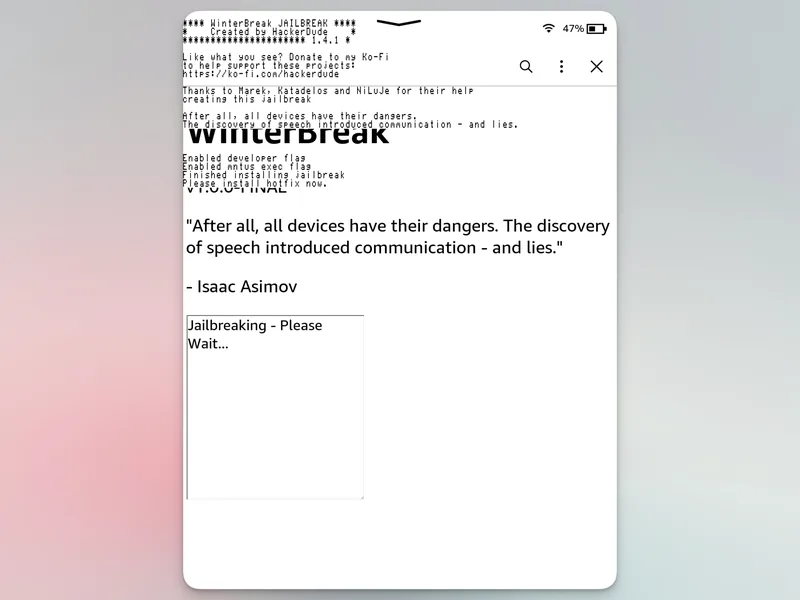
If your firmware is compatible, the 'WinterBreak' jailbreak, often detailed on Kindle Modding sites, is a popular choice. These guides offer step-by-step instructions with visual aids. Remember, even with newer devices, jailbreaking can potentially void your warranty. Weigh the benefits of enhanced functionality against these potential risks.