Picture this: It's Monday morning, you're rushing to catch the train, and a critical email demands an immediate response. You pull out your sleek glass slab of a phone, but the keyboard is a chaotic mess on the screen, autocorrect mangles your urgent message, and by the time you hit send, you've missed your stop. For millions of professionals, this digital friction isn't just an annoyance--it's a daily barrier to productivity. Enter the Clicks Communicator, a device that dares to ask: what if we went back to move forward?
The BlackBerry Renaissance
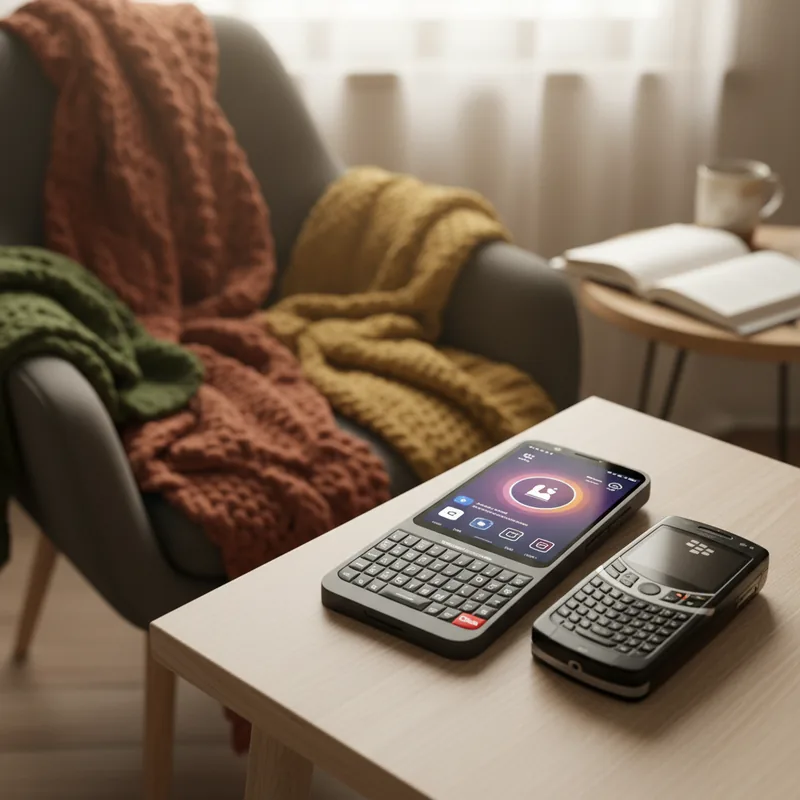
Clicks Technology, the company that went viral for its physical keyboard cases, has unveiled a standalone device that feels like a love letter to the golden age of mobile efficiency. The Clicks Communicator is a pocketable Android handset that looks deceptively similar to the BlackBerry devices that once ruled the corporate world. However, this isn't mere nostalgia; it's a calculated response to the growing fatigue surrounding infinite scrolling and glass keyboards.
Running Android 16, this new android smartphone is designed to function primarily as a minimalist companion to your primary device. The philosophy is simple: strip away the distractions of social media feeds and endless notifications, leaving only the essentials. As noted in recent studies on digital minimalism, reducing app clutter can significantly lower cognitive load, allowing for deeper focus (Harvard, 2024). By loading only the apps you need for immediate communication--email, messaging, calendar--you transform the device into a pocket-sized command center.
Engineering Distraction-Free Living
The tactile experience is where the Communicator truly shines. The keys are larger and more responsive than those on the company's viral keyboard case, offering a satisfying click that touchscreens simply cannot replicate. But the innovation doesn't stop at the QWERTY layout. The device features a Signal LED--a customizable light ring around the side button that glows different colors based on who is trying to reach you.
Imagine setting a soft green pulse for your spouse, a sharp red for your boss, and a calm blue for general notifications. This visual triage system allows you to gauge the urgency of a notification without even picking up the phone, a feature that research suggests can reduce the anxiety associated with constant connectivity (Mayo Clinic, 2023).
- The Red Clicks Key: A dedicated button for launching custom shortcuts and AI actions instantly.
- The Spacebar Fingerprint Sensor: Unlocking the phone becomes seamless, located exactly where your thumb rests.
- Touch-Sensitive Keypad: You can scroll through messages by sliding your finger across the keyboard itself, keeping the screen clean.
Despite its retro focus, the Communicator isn't technologically archaic. It features a 4.03-inch OLED touchscreen for when visual interaction is necessary, a 50-MP rear camera with OIS, and support for Qi2 wireless charging. It even retains the increasingly rare 3.5mm headphone jack and microSD expansion, supporting up to 2TB of additional storage.
Real-World Scenarios: Who Is This For?
To understand the utility of this new android smartphone, we must look beyond the specs. Consider the "Deep Work" Executive: She leaves her iPhone in the locker during a strategy retreat, carrying only the Clicks Communicator. She can reply to urgent Slack messages and sign contracts via PDF, but she cannot doom-scroll TikTok. Her attention remains undivided.
Or the One-Handed Commuter: Standing on a packed subway, typing with one thumb on a glass screen is a recipe for typos. With the Communicator, the physical keys allow for rapid, accurate typing without needing to look down, maintaining situational awareness while staying responsive.
Finally, there is the Digital Detox Enthusiast: Someone who wants to stay reachable for family but wants to break the dopamine loop of modern apps. By using the Communicator as a secondary number (it supports dual-SIM), they can enjoy weekends free from the lure of Instagram likes, knowing they won't miss an emergency call.
The Alternative: Keyboard Power Bank
For those not ready to commit to a second handset, Clicks also unveiled a quirky hybrid: the Clicks Power Keyboard. This is a magnetic wireless power bank for your existing phone that features a sliding physical Bluetooth keyboard. It's a strange but compelling middle ground. You attach it to the back of your iPhone or Android device for a 2,150mAh top-up, and when you need to type, you slide out the keys.
While the 5W charging speed is sluggish compared to modern standards (an Anker equivalent offers 15W for less money), the utility of having a physical keyboard that works with your phone, tablet, or even TV is undeniable. It bridges the gap between the full Communicator experience and the convenience of your current ecosystem.
Pricing and Availability
The Clicks Communicator is currently available for pre-order at a launch price of $399 (plus shipping), a $100 discount off the expected $499 retail price. Pre-orders also include two free swappable back covers. The Power Keyboard is priced at $80 and is slated to ship this Spring.
In a market obsessed with folding screens and AR glasses, the Clicks Communicator is a defiant outlier. It suggests that perhaps the future of mobile productivity isn't about seeing more, but about touching something real.