Ever feel like your Mac is a powerful tool with a learning curve steeper than you'd like? You're not alone. While we master complex software, the simplest tasks can sometimes feel like a scavenger hunt through endless menus. Imagine having a smart assistant, not just for broad questions, but for the very screen you're looking at - a digital companion that anticipates your needs and guides you instantly. That's the promise of Clicky, a fascinating new AI tool designed to be that ever-present helper, right alongside your cursor.
Meet Clicky: Your AI Sidekick on Mac
Clicky is more than just another chatbot; it's a lightweight, versatile AI bot that lives discreetly on your macOS desktop, always within reach. Developed by Farza Majeed and powered by Claude AI, it offers context-sensitive help by intelligently capturing what's on your screen *only* when you need it. Think of it as a patient tutor who knows exactly what you're struggling with, whether you're navigating a complex application or trying to find a specific setting. In return for your email, you get an AI companion that can genuinely streamline your workflow.
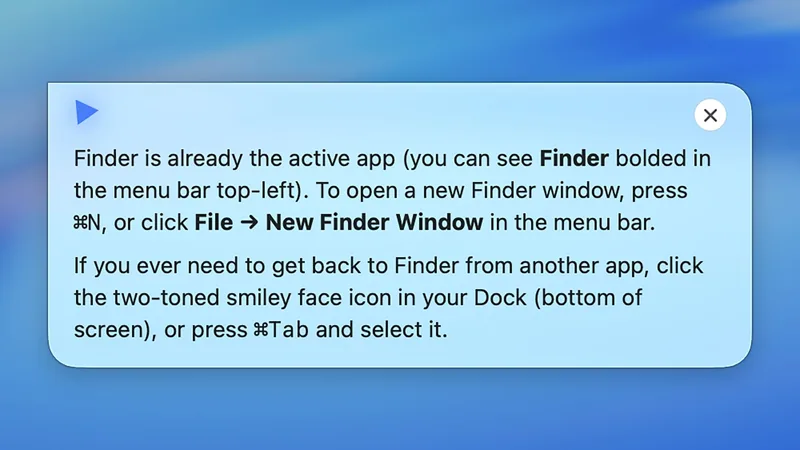
Getting started with Clicky is straightforward. After a brief, friendly introduction from its creator, you'll be guided through granting it screen access - a necessary step for it to understand your current task. Majeed emphasizes that this screen capture is temporary and activated only when you invoke Clicky, ensuring your privacy remains intact. You can easily quit the application anytime via its menu bar icon.
A subtle, customizable flag floats near your cursor, a visual reminder of your AI companion's presence. While it takes a moment to get used to, it quickly fades into the background, becoming a natural extension of your workspace. The default activation shortcut is Ctrl+Option, a combination you'll quickly memorize, and double-tapping Ctrl allows you to type commands instead of speaking.
How Clicky Enhances Your Workflow
The real magic of Clicky lies in its ability to provide instant, relevant assistance. Stuck on how to change your desktop wallpaper? Ask Clicky. Not only will it explain the steps, but it can also guide your cursor directly to the relevant menu item, saving you precious time and mental energy. This context-aware guidance extends to system settings, where Clicky can explain the function of obscure buttons or toggles, offering insights into why you might want to enable or disable them.
Beyond system settings, Clicky proves invaluable within applications. Imagine wrestling with Photoshop for the first time. You can ask Clicky for advice on specific tools or filters, and it will point out the exact buttons and sliders you need, even offering best practices for achieving a desired effect. This deep integration transforms daunting software into something more approachable. It's a truly intelligent 'clicky' is macos companion that learns with you.
Browsing the web becomes more efficient, too. Curious about a website's trustworthiness? Clicky can offer an assessment. Need a quick summary of a lengthy article? It's on it. Even basic browser tasks, like clearing your history, can be explained and guided by this AI assistant. It's this versatility that makes 'clicky' is macos companion such a compelling proposition for Mac users.
Consider these scenarios: You're trying to organize your ever-growing cloud storage but can't recall the best way to set up folder structures. A quick query to Clicky can provide tailored advice and even highlight the relevant settings within your cloud service interface. Or perhaps you're learning a new, complex software for work, and the keyboard shortcuts are overwhelming. Clicky can identify the shortcut for a function you're trying to use and explain it, making your learning curve much smoother. Even troubleshooting a minor software glitch can be demystified; just ask Clicky what an error message means, and it can offer potential solutions.
While Clicky is still in its early stages, and further customization options would be welcome, its current capabilities are genuinely impressive. It fills a crucial gap, providing immediate, on-screen assistance without the need to break your focus by searching external resources. For anyone looking to maximize their productivity and learn their Mac more deeply, 'clicky' is macos companion is a tool worth exploring. It's easy to see how this type of integrated AI assistance could become a standard feature in operating systems of the future, but for now, this independent solution offers a glimpse into that smarter computing experience. Having 'clicky' is macos companion at your side truly changes how you interact with your machine.
The potential for an AI like Clicky is vast. As it evolves, we can anticipate even deeper integrations and more proactive assistance. For now, it stands as a testament to the power of focused, context-aware AI tools, proving that sometimes, the most helpful assistant is the one that's always right there with you. It's a powerful example of how 'clicky' is macos companion can redefine user experience.